
Deploying TideSQL on AWS Kubernetes with S3 Object Store (Cloud-Native MariaDB)
published on April 3rd, 2026
So most people know that when it comes to setting up replicas and fail over for a relational database in a non stateless system is a bit of pain. In modern day with the availability of object storage, we can solve this problem by making our database stateless.
TidesDB is optionally cloud-native. On a single EC2 instance it’s a fast LSM-tree engine for MariaDB through TideSQL. Add an S3 bucket and it becomes a distributed storage system where every node shares the same data through object storage. No etcd, no Raft, no Paxos, simply SSTables in a bucket, WAL segments synced for near-real-time reads, and MANIFEST files that tell replicas what’s new.
Doing this can be rather complex without some guidance on a known pattern that works well, thus in this article I will be going through the steps to deploy a production TideSQL cluster on Kubernetes with AWS S3 as the storage backend. The cluster consists of a read-write primary, two read-only replicas, and an automatic failover controller. All data lives durably in S3 while local disk serves as a fast cache.
The storage engine maintains a four-tier storage hierarchy automatically.
Table definitions are replicated automatically through a reserved __tidesql_schema column family in S3. Replicas discover tables on first query without manual DDL synchronization.
When the primary fails, any replica can be promoted with a single SQL command. The failover controller automates this.
Prerequisites
- An AWS account with EKS access and an IAM user with
AmazonEC2ContainerRegistryFullAccessandAmazonS3FullAccesspolicies - Docker installed locally to build the image
kubectlandawsCLI available (AWS CloudShell has both pre-installed)
Build the Docker image with S3 support
From the TideSQL repository root
sudo docker build -f docker/ubuntu/Dockerfile --build-arg WITH_S3=1 --build-arg DISABLED_ENGINES="ROCKSDB,MROONGA,SPIDER,CONNECT,OQGRAPH,COLUMNSTORE,SPHINX" -t tidesdb/tidesql:latest .Push to ECR (replace <account-id> with your AWS account ID)
aws ecr get-login-password --region us-east-1 | sudo docker login --username AWS --password-stdin <account-id>.dkr.ecr.us-east-1.amazonaws.comaws ecr create-repository --repository-name tidesdb/tidesql --region us-east-1sudo docker tag tidesdb/tidesql:latest <account-id>.dkr.ecr.us-east-1.amazonaws.com/tidesdb/tidesql:latestsudo docker push <account-id>.dkr.ecr.us-east-1.amazonaws.com/tidesdb/tidesql:latestEKS nodes pull from ECR automatically using the default node IAM role.
1. Create an EKS cluster and connect
If you’re using AWS CloudShell, install eksctl first (it’s not pre-installed)
curl -sLO "https://github.com/eksctl-io/eksctl/releases/latest/download/eksctl_Linux_amd64.tar.gz"tar xzf eksctl_Linux_amd64.tar.gzsudo mv eksctl /usr/local/bin/Create the cluster
eksctl create cluster --name tidesql-cluster --region us-east-1 --node-type m5.large --nodes 3This takes roughly 15 minutes. It creates the cluster, node group, and configures kubectl automatically.
If you already have a cluster, point kubectl at it
aws eks update-kubeconfig --region us-east-1 --name tidesql-clusterVerify you can reach the cluster
kubectl get nodesYou should see your nodes in Ready status. All remaining commands can be run from your local machine, an EC2 instance, or AWS CloudShell.
EKS does not include a default storage provisioner. Install the EBS CSI driver so PersistentVolumeClaims can bind. First, associate an OIDC provider (required for the driver’s IAM permissions)
eksctl utils associate-iam-oidc-provider --region us-east-1 --cluster tidesql-cluster --approveCreate an IAM service account for the driver
eksctl create iamserviceaccount --name ebs-csi-controller-sa --namespace kube-system --cluster tidesql-cluster --region us-east-1 --attach-policy-arn arn:aws:iam::aws:policy/service-role/AmazonEBSCSIDriverPolicy --approve --override-existing-serviceaccountsInstall the addon
eksctl create addon --name aws-ebs-csi-driver --cluster tidesql-cluster --region us-east-1 --forceVerify the driver is running (all containers should be ready)
kubectl get pods -n kube-system -l app.kubernetes.io/name=aws-ebs-csi-driverThen create a default StorageClass
kubectl apply -f - <<'EOF'apiVersion: storage.k8s.io/v1kind: StorageClassmetadata: name: gp3 annotations: storageclass.kubernetes.io/is-default-class: "true"provisioner: ebs.csi.aws.comparameters: type: gp3volumeBindingMode: WaitForFirstConsumerreclaimPolicy: DeleteEOF2. Create the namespace
kubectl create namespace tidesql3. Create the S3 bucket
aws s3 mb s3://tidesdb-production --region us-east-1Your IAM user needs the AmazonS3FullAccess managed policy (or a custom policy with s3:GetObject, s3:PutObject, s3:DeleteObject, s3:ListBucket on this bucket).
4. Deploy the primary
The primary runs as a StatefulSet with persistent local storage for caching. It writes to S3 and serves read-write traffic.
kubectl apply -n tidesql -f - <<'EOF'apiVersion: v1kind: ConfigMapmetadata:  name: tidesdb-primary-configdata:  tidesdb.cnf: |    [mariadb]    plugin-load-add=ha_tidesdb.so
    # Object store    tidesdb_object_store_backend=S3    tidesdb_s3_endpoint=s3.amazonaws.com    tidesdb_s3_bucket=tidesdb-production    tidesdb_s3_region=us-east-1    tidesdb_s3_access_key=REPLACE_WITH_ACCESS_KEY    tidesdb_s3_secret_key=REPLACE_WITH_SECRET_KEY    tidesdb_s3_use_ssl=ON    tidesdb_s3_path_style=OFF    tidesdb_objstore_local_cache_max=512M    tidesdb_objstore_wal_sync_threshold=1M
    # Engine tuning    tidesdb_unified_memtable=ON    tidesdb_unified_memtable_write_buffer_size=128M    tidesdb_block_cache_size=256M    tidesdb_flush_threads=4    tidesdb_compaction_threads=4    tidesdb_log_level=WARN---apiVersion: apps/v1kind: StatefulSetmetadata:  name: tidesql-primaryspec:  serviceName: tidesql-primary  replicas: 1  selector:    matchLabels:      app: tidesql      role: primary  template:    metadata:      labels:        app: tidesql        role: primary    spec:      containers:        - name: mariadb          image: <your-ecr-registry>/tidesql:latest  # e.g. 123456789012.dkr.ecr.us-east-1.amazonaws.com/tidesdb/tidesql:latest          command: ["/bin/bash", "-c"]          args:            - |              mkdir -p /etc/mysql/custom && cp /opt/tidesdb-config/tidesdb.cnf /etc/mysql/custom/tidesdb-k8s.cnf              exec /usr/local/bin/tidesql-entrypoint.sh          ports:            - containerPort: 3306              name: mysql          volumeMounts:            - name: config              mountPath: /opt/tidesdb-config/tidesdb.cnf              subPath: tidesdb.cnf            - name: data              mountPath: /var/lib/mysql          livenessProbe:            exec:              command: ["mariadb-admin", "ping", "-h", "localhost"]            initialDelaySeconds: 30            periodSeconds: 10          readinessProbe:            exec:              command: ["mariadb", "-h", "localhost", "-e", "SELECT 1"]            initialDelaySeconds: 10            periodSeconds: 5      volumes:        - name: config          configMap:            name: tidesdb-primary-config  volumeClaimTemplates:    - metadata:        name: data      spec:        accessModes: ["ReadWriteOnce"]        storageClassName: gp3        resources:          requests:            storage: 100Gi---apiVersion: v1kind: Servicemetadata:  name: tidesql-primaryspec:  type: ClusterIP  selector:    app: tidesql    role: primary  ports:    - port: 3306      targetPort: 3306      name: mysqlEOF
Wait for the primary to be ready (the first pull of the ~2 GB image can take a few minutes)
kubectl wait -n tidesql --for=condition=Ready \ pod -l app=tidesql,role=primary --timeout=300s5. Create a monitor user
The failover controller runs in a separate pod and needs TCP-based authentication to check the primary and promote replicas. MariaDB’s root user authenticates via unix socket only (localhost), so we create a dedicated monitor user.
kubectl exec -n tidesql tidesql-primary-0 -- \ mariadb -e " CREATE USER 'monitor'@'%' IDENTIFIED BY 'M0nitor!Pass9'; GRANT ALL PRIVILEGES ON *.* TO 'monitor'@'%' WITH GRANT OPTION; FLUSH PRIVILEGES; "Also create your application user
kubectl exec -n tidesql tidesql-primary-0 -- \ mariadb -e " CREATE DATABASE app_prod; CREATE USER 'app_user'@'%' IDENTIFIED BY 'YourStrongPassword!2026'; GRANT SELECT, INSERT, UPDATE, DELETE, CREATE, DROP, ALTER, INDEX ON app_prod.* TO 'app_user'@'%'; FLUSH PRIVILEGES; "6. Deploy read replicas
Replicas point to the same S3 bucket with tidesdb_replica_mode=ON. They use emptyDir for local cache since all durable data is in S3. If a replica pod is replaced, the new one simply re-syncs from S3.
kubectl apply -n tidesql -f - <<'EOF'apiVersion: v1kind: ConfigMapmetadata:  name: tidesdb-replica-configdata:  tidesdb.cnf: |    [mariadb]    plugin-load-add=ha_tidesdb.so
    # Object store (same bucket as primary)    tidesdb_object_store_backend=S3    tidesdb_s3_endpoint=s3.amazonaws.com    tidesdb_s3_bucket=tidesdb-production    tidesdb_s3_region=us-east-1    tidesdb_s3_access_key=REPLACE_WITH_ACCESS_KEY    tidesdb_s3_secret_key=REPLACE_WITH_SECRET_KEY    tidesdb_s3_use_ssl=ON    tidesdb_s3_path_style=OFF    tidesdb_objstore_local_cache_max=512M
    # Replica mode    tidesdb_replica_mode=ON    tidesdb_replica_sync_interval=1000000
    # Engine tuning    tidesdb_unified_memtable=ON    tidesdb_unified_memtable_write_buffer_size=128M    tidesdb_block_cache_size=256M    tidesdb_flush_threads=2    tidesdb_compaction_threads=2    tidesdb_log_level=WARN---apiVersion: apps/v1kind: Deploymentmetadata:  name: tidesql-replicaspec:  replicas: 2  selector:    matchLabels:      app: tidesql      role: replica  template:    metadata:      labels:        app: tidesql        role: replica    spec:      containers:        - name: mariadb          image: <your-ecr-registry>/tidesql:latest  # e.g. 123456789012.dkr.ecr.us-east-1.amazonaws.com/tidesdb/tidesql:latest          command: ["/bin/bash", "-c"]          args:            - |              mkdir -p /etc/mysql/custom && cp /opt/tidesdb-config/tidesdb.cnf /etc/mysql/custom/tidesdb-k8s.cnf              exec /usr/local/bin/tidesql-entrypoint.sh          ports:            - containerPort: 3306              name: mysql          volumeMounts:            - name: config              mountPath: /opt/tidesdb-config/tidesdb.cnf              subPath: tidesdb.cnf            - name: cache              mountPath: /var/lib/mysql          readinessProbe:            exec:              command: ["mariadb", "-h", "localhost", "-e", "SELECT 1"]            initialDelaySeconds: 10            periodSeconds: 5      volumes:        - name: config          configMap:            name: tidesdb-replica-config        - name: cache          emptyDir:            sizeLimit: 50Gi---apiVersion: v1kind: Servicemetadata:  name: tidesql-replicaspec:  type: ClusterIP  selector:    app: tidesql    role: replica  ports:    - port: 3306      targetPort: 3306      name: mysqlEOF
Wait for replicas
kubectl wait -n tidesql --for=condition=Ready \ pod -l app=tidesql,role=replica --timeout=300sCreate the monitor user on replicas too (needed for failover promotion)
for pod in $(kubectl get pods -n tidesql -l role=replica -o name); do kubectl exec -n tidesql "$pod" -- \ mariadb -e " CREATE USER IF NOT EXISTS 'monitor'@'%' IDENTIFIED BY 'M0nitor!Pass9'; GRANT ALL PRIVILEGES ON *.* TO 'monitor'@'%' WITH GRANT OPTION; FLUSH PRIVILEGES; "done7. Deploy the failover controller
The failover controller is a lightweight pod that pings the primary every 5 seconds. After 3 consecutive failures, it promotes a replica via SET GLOBAL tidesdb_promote_primary = ON and exits.
kubectl apply -n tidesql -f - <<'EOF'apiVersion: v1kind: ConfigMapmetadata:  name: tidesdb-failover-scriptdata:  failover.sh: |    #!/bin/bash    set -euo pipefail
    PRIMARY_HOST="${PRIMARY_HOST:-tidesql-primary}"    PRIMARY_PORT="${PRIMARY_PORT:-3306}"    REPLICA_HOST="${REPLICA_HOST:-tidesql-replica}"    REPLICA_PORT="${REPLICA_PORT:-3306}"    CHECK_INTERVAL="${CHECK_INTERVAL:-5}"    FAILURE_THRESHOLD="${FAILURE_THRESHOLD:-3}"    MYSQL_USER="${MYSQL_USER:-monitor}"    MYSQL_PASSWORD="${MYSQL_PASSWORD:-}"
    FAILURES=0
    log() { echo "[$(date -u '+%Y-%m-%dT%H:%M:%SZ')] $*"; }
    check_primary() {        mariadb -h "$PRIMARY_HOST" -P "$PRIMARY_PORT" \                -u "$MYSQL_USER" -p"$MYSQL_PASSWORD" \                -e "SELECT 1" > /dev/null 2>&1    }
    promote_replica() {        log "PROMOTING replica $REPLICA_HOST to primary"        mariadb -h "$REPLICA_HOST" -P "$REPLICA_PORT" \                -u "$MYSQL_USER" -p"$MYSQL_PASSWORD" \                -e "SET GLOBAL tidesdb_promote_primary = ON" 2>&1        log "Promotion command sent"    }
    log "TidesQL Failover Controller started"    log "Primary: $PRIMARY_HOST:$PRIMARY_PORT"    log "Replica: $REPLICA_HOST:$REPLICA_PORT"    log "Check interval: ${CHECK_INTERVAL}s, failure threshold: $FAILURE_THRESHOLD"
    while true; do        if check_primary; then            [ "$FAILURES" -gt 0 ] && log "Primary recovered after $FAILURES failures"            FAILURES=0        else            FAILURES=$((FAILURES + 1))            log "Primary check failed ($FAILURES/$FAILURE_THRESHOLD)"            if [ "$FAILURES" -ge "$FAILURE_THRESHOLD" ]; then                promote_replica                log "Failover complete. Exiting."                exit 0            fi        fi        sleep "$CHECK_INTERVAL"    done---apiVersion: apps/v1kind: Deploymentmetadata:  name: tidesql-failover-controllerspec:  replicas: 1  selector:    matchLabels:      app: tidesql-failover  template:    metadata:      labels:        app: tidesql-failover    spec:      containers:        - name: controller          image: mariadb:latest          command: ["bash", "/scripts/failover.sh"]          env:            - name: PRIMARY_HOST              value: "tidesql-primary"            - name: REPLICA_HOST              value: "tidesql-replica"            - name: CHECK_INTERVAL              value: "5"            - name: FAILURE_THRESHOLD              value: "3"            - name: MYSQL_USER              value: "monitor"            - name: MYSQL_PASSWORD              value: "M0nitor!Pass9"          volumeMounts:            - name: scripts              mountPath: /scripts      volumes:        - name: scripts          configMap:            name: tidesdb-failover-script            defaultMode: 0755EOF
8. Verify the cluster
Check all pods are running
kubectl get pods -n tidesql -o wide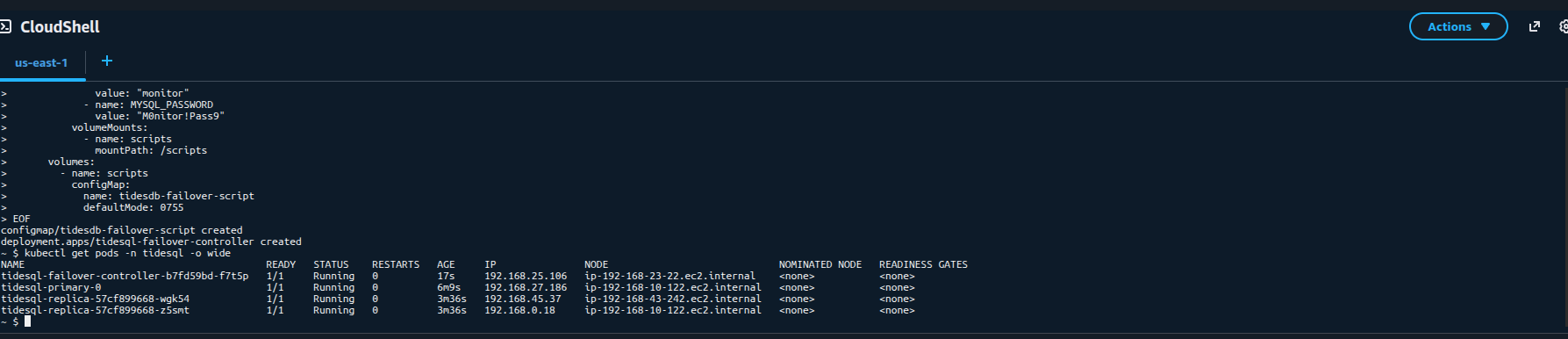
Verify the TidesDB plugin and S3 configuration on the primary
kubectl exec -n tidesql tidesql-primary-0 -- \ mariadb -e "SHOW ENGINE TIDESDB STATUS\G" | head -30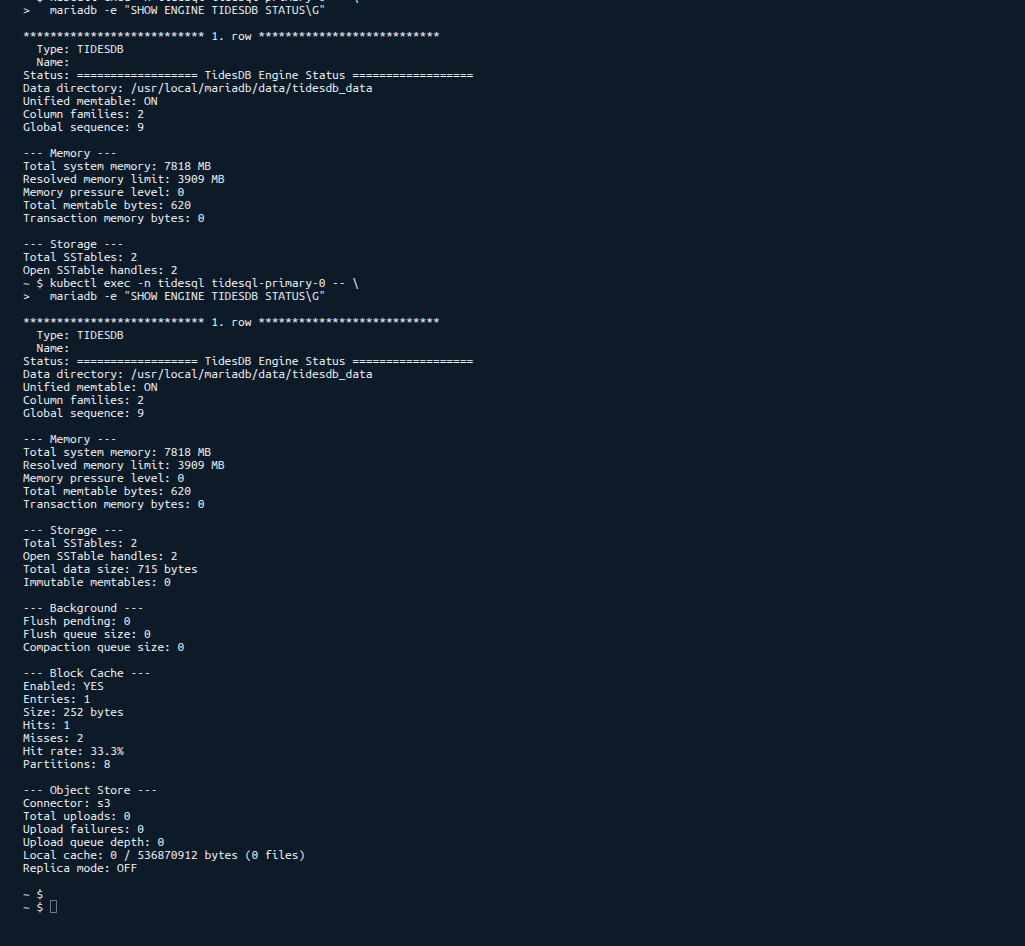
Write test data and verify it reaches the replicas
# Write to primarykubectl exec -n tidesql tidesql-primary-0 -- \  mariadb -e "    CREATE TABLE app_prod.items (      id INT PRIMARY KEY,      name VARCHAR(100)    ) ENGINE=TIDESDB;    INSERT INTO app_prod.items VALUES (1, 'alpha'), (2, 'beta'), (3, 'gamma');    OPTIMIZE TABLE app_prod.items;  "
# Wait for S3 upload + replica syncsleep 15
# Read from replicakubectl exec -n tidesql deploy/tidesql-replica -- \  mariadb -e "SELECT * FROM app_prod.items ORDER BY id"
9. Test failover
Simulate a primary failure
# Kill the primary podkubectl delete pod -n tidesql tidesql-primary-0 --grace-period=0 --forceWatch the failover controller logs
kubectl logs -n tidesql deploy/tidesql-failover-controller -fYou should see
[2026-04-03T...] Primary check failed (1/3)[2026-04-03T...] Primary check failed (2/3)[2026-04-03T...] Primary check failed (3/3)[2026-04-03T...] PROMOTING replica tidesql-replica to primary[2026-04-03T...] Promotion command sent[2026-04-03T...] Failover complete. Exiting.Verify the promoted replica accepts writes
kubectl exec -n tidesql deploy/tidesql-replica -- \ mariadb -e "INSERT INTO app_prod.items VALUES (4, 'delta')"10. Connecting your application
From within the cluster, applications connect via the Kubernetes services
# Read-write (primary)tidesql-primary.tidesql.svc.cluster.local:3306
# Read-only (load-balanced across replicas)tidesql-replica.tidesql.svc.cluster.local:3306
Example application connection string
mariadb -h tidesql-primary.tidesql.svc.cluster.local -P 3306 -u app_user -p'YourStrongPassword!2026' app_prodFor external access, create a LoadBalancer or use kubectl port-forward
kubectl port-forward -n tidesql svc/tidesql-primary 3306:330611. Production tuning
Key settings explained
| Setting | What it does |
|---|---|
tidesdb_block_cache_size | In-memory cache for SSTable blocks. Larger = fewer S3 fetches. Size to 25-50% of available RAM |
tidesdb_unified_memtable_write_buffer_size | Write buffer before flushing to SSTables. Larger = fewer flushes, more memory |
tidesdb_flush_threads | Threads flushing memtables to disk/S3. 2-4 is typical, increase for write-heavy workloads |
tidesdb_compaction_threads | Threads merging SSTables. 2-4 is typical, increase for large datasets |
tidesdb_objstore_local_cache_max | Maximum local disk used as cache before evicting to S3-only. Set to ~80% of your data volume |
Example tuning by node size
# m5.large (8 GB RAM, EBS)tidesdb_block_cache_size=2Gtidesdb_unified_memtable_write_buffer_size=256Mtidesdb_flush_threads=2tidesdb_compaction_threads=2tidesdb_objstore_local_cache_max=2G
# m5.xlarge (16 GB RAM, EBS)tidesdb_block_cache_size=4Gtidesdb_unified_memtable_write_buffer_size=512Mtidesdb_flush_threads=4tidesdb_compaction_threads=4tidesdb_objstore_local_cache_max=4G
# i4i.xlarge (32 GB RAM, 940 GB NVMe)tidesdb_block_cache_size=8Gtidesdb_unified_memtable_write_buffer_size=512Mtidesdb_flush_threads=4tidesdb_compaction_threads=4tidesdb_objstore_local_cache_max=800G
Using NVMe instance storage
Instances with local NVMe drives (i3, i4i, m5d, c5d, r5d families) provide significantly faster I/O for the local cache compared to EBS.
To use NVMe
- Create the cluster with NVMe-equipped nodes
eksctl create cluster --name tidesql-cluster --region us-east-1 --node-type i4i.xlarge --nodes 3- The NVMe drives are raw block devices. Format and mount them with a DaemonSet or user data script, then use a
hostPathvolume instead of a PVC
volumes: - name: data hostPath: path: /mnt/nvme/tidesql type: DirectoryOrCreate- Set
tidesdb_objstore_local_cache_maxto ~80% of the NVMe capacity. With i4i.xlarge (940 GB NVMe), that’s ~800G of hot data served at local NVMe speed, with the full dataset in S3.
NVMe instance storage is ephemeral - data is lost if the instance is terminated. This is fine for TideSQL in object store mode since all durable data lives in S3 and the local disk is purely a cache.
Scale replicas
kubectl scale -n tidesql deployment/tidesql-replica --replicas=4WAL sync on commit
For RPO=0 (zero data loss on failover), enable WAL sync on every commit
tidesdb_objstore_wal_sync_on_commit=ONThis increases write latency since every commit uploads the WAL segment to S3, but guarantees replicas see every committed transaction. For most workloads, the default threshold-based sync (tidesdb_objstore_wal_sync_threshold=1M) provides a good balance.
Resource requests
Add resource requests and limits to keep pods scheduled predictably
resources: requests: cpu: "2" memory: "4Gi" limits: cpu: "4" memory: "8Gi"Summary
| Component | Kind | Purpose |
|---|---|---|
tidesql-primary | StatefulSet (1 replica) | Read-write, uploads SSTables to S3 |
tidesql-replica | Deployment (2+ replicas) | Read-only, polls S3 for updates |
tidesql-failover-controller | Deployment (1 replica) | Health-checks primary, promotes replica on failure |
tidesdb-primary-config | ConfigMap | Primary engine configuration (includes S3 credentials) |
tidesdb-replica-config | ConfigMap | Replica engine configuration |
tidesdb-failover-script | ConfigMap | Failover controller shell script |
tidesql-primary | Service (ClusterIP) | Read-write endpoint |
tidesql-replica | Service (ClusterIP) | Read-only endpoint (load-balanced) |
All data lives durably in S3. Local disk is a cache. Pods can be replaced, scaled, or promoted without data loss.
This is a cloud-native, production-ready deployment pattern for MariaDB+TidesDB on Kubernetes with S3 object storage.
Thank you for reading!