
New Benchmark Environment
published on February 12th, 2026
Well, I’ve been wanting to get a good dedicated server for a while now. I finally got around to it. I chose go to go with Hetzner.
This is what I ended up getting purely for benchmarking and analysis:
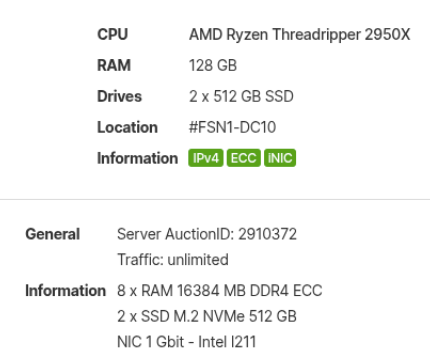
The prices are great, for just over $100 CAD per month you can get above from the server auctions.
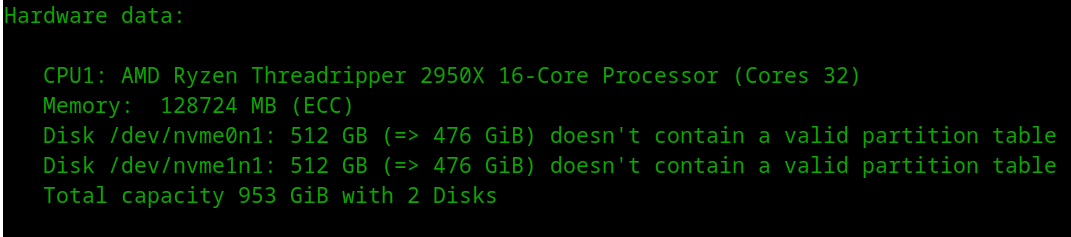
I ended up creating custom installimage and post-install scripts for the server as I wanted it to be setup a certain way for effective benchmarking, to really push storage engines.
I placed the files below in /tmp on the server.
setup.conf
DRIVE1 /dev/nvme0n1
SWRAID 0
BOOTLOADER grubHOSTNAME xfsPART swap  swap   4GPART /boot ext4   1GPART /     xfs    allIMAGE /root/images/Ubuntu-2204-jammy-amd64-base.tar.gz
post-install.sh
#!/usr/bin/env bash# Note: Not using set -e because some commands fail in chroot but are non-fatalset -uo pipefail
echo "== Post-install: packages =="export DEBIAN_FRONTEND=noninteractiveapt-get update -yapt-get install -y --no-install-recommends \  xfsprogs nvme-cli fio locales parted
echo "== Post-install: locale fix (prevents LC_* warnings) =="sed -i 's/^# *\(en_US.UTF-8 UTF-8\)/\1/' /etc/locale.gen || truelocale-genupdate-locale LANG=en_US.UTF-8
echo "== Post-install: fstab mount options for XFS (LSM-optimized) =="# In chroot, findmnt doesn't work reliably. Parse fstab directly.XFS_OPTS="defaults,noatime,nodiratime,discard,inode64,logbufs=8,logbsize=256k"# noatime         -- skip access time updates (reduces write amplification)# nodiratime      -- skip dir access time# discard         -- enable TRIM for SSD (matches RocksDB benchmark setup)# inode64         -- allow inodes anywhere on disk# logbufs=8       -- more log buffers for write-heavy workloads# logbsize=256k   -- larger log buffer size
# Update XFS root mount options in fstabif grep -q 'xfs' /etc/fstab; then  sed -i 's|^\(UUID=[^ ]*\s\+/\s\+xfs\s\+\)[^ ]*|\1'"${XFS_OPTS}"'|' /etc/fstab  echo "Updated /etc/fstab with XFS options: ${XFS_OPTS}"  cat /etc/fstabfi
echo "== Post-install: enable TRIM timer (will activate on boot) =="systemctl enable fstrim.timer 2>/dev/null || true
echo "== Post-install: I/O scheduler udev rule (applies on boot) =="cat > /etc/udev/rules.d/60-nvme-scheduler.rules << 'EOF'# Set I/O scheduler to none for NVMe devicesACTION=="add|change", KERNEL=="nvme[0-9]*n[0-9]*", ATTR{queue/scheduler}="none"EOF
echo "== Post-install: sysctl tuning for LSM workloads =="cat > /etc/sysctl.d/99-lsm-bench.conf << 'EOF'# Reduce swappiness for in-memory workloadsvm.swappiness = 1# Increase dirty ratio for write batchingvm.dirty_ratio = 40vm.dirty_background_ratio = 10# Reduce vfs_cache_pressurevm.vfs_cache_pressure = 50EOF
echo "== Post-install: first-boot systemd service to setup data drive =="# Create a systemd service (more reliable than rc.local on Ubuntu 22.04)cat > /etc/systemd/system/setup-data-drive.service << 'SVCEOF'[Unit]Description=One-time setup of data driveAfter=local-fs.targetConditionPathExists=!/data/.setup-complete
[Service]Type=oneshotExecStart=/usr/local/bin/setup-data-drive.shRemainAfterExit=yes
[Install]WantedBy=multi-user.targetSVCEOF
cat > /usr/local/bin/setup-data-drive.sh << 'SCRIPTEOF'#!/bin/bashset -xDATA_DEV="/dev/nvme1n1"DATA_OPTS="defaults,noatime,nodiratime,discard,inode64,logbufs=8,logbsize=256k"
if [[ ! -b "${DATA_DEV}" ]]; then  echo "Data device ${DATA_DEV} not found, skipping"  exit 0fi
if mountpoint -q /data; then  echo "/data already mounted, skipping"  exit 0fi
echo "Setting up ${DATA_DEV} as /data..."wipefs -af "${DATA_DEV}"parted -s "${DATA_DEV}" mklabel gptparted -s "${DATA_DEV}" mkpart primary 0% 100%partprobe "${DATA_DEV}"sleep 3  # Wait for kernel to create partition device
# Handle both nvme0n1p1 and nvme0n1-part1 naming conventionsif [[ -b "${DATA_DEV}p1" ]]; then  PART="${DATA_DEV}p1"elif [[ -b "${DATA_DEV}-part1" ]]; then  PART="${DATA_DEV}-part1"else  echo "ERROR: Partition device not found"  ls -la /dev/nvme*  exit 1fi
mkfs.xfs -f -K "${PART}"DATA_UUID="$(blkid -s UUID -o value "${PART}")"mkdir -p /dataecho "UUID=${DATA_UUID} /data xfs ${DATA_OPTS} 0 2" >> /etc/fstabmount /datatouch /data/.setup-completeecho "Data drive setup complete: /data on ${PART} (UUID=${DATA_UUID})"SCRIPTEOFchmod +x /usr/local/bin/setup-data-drive.sh
systemctl enable setup-data-drive.service 2>/dev/null || true
echo "== Post-install: initramfs refresh =="apt-get install -y --no-install-recommends initramfs-toolsupdate-initramfs -u -k all
echo "== Post-install done =="
Stop and wipe existing RAID (run in rescue mode) this is required by Hetzner.
mdadm --stop /dev/md0 2>/dev/null || truemdadm --stop /dev/md1 2>/dev/null || truemdadm --stop /dev/md2 2>/dev/null || truemdadm --zero-superblock /dev/nvme0n1p1 2>/dev/null || truemdadm --zero-superblock /dev/nvme0n1p2 2>/dev/null || truemdadm --zero-superblock /dev/nvme0n1p3 2>/dev/null || truemdadm --zero-superblock /dev/nvme1n1p1 2>/dev/null || truemdadm --zero-superblock /dev/nvme1n1p2 2>/dev/null || truemdadm --zero-superblock /dev/nvme1n1p3 2>/dev/null || truewipefs -af /dev/nvme0n1wipefs -af /dev/nvme1n1I basically in rescue mode setup the server with this one command after setting up scripts:
chmod +x /tmp/post-install.shinstallimage -a -c /tmp/setup.conf -x /tmp/post-install.sh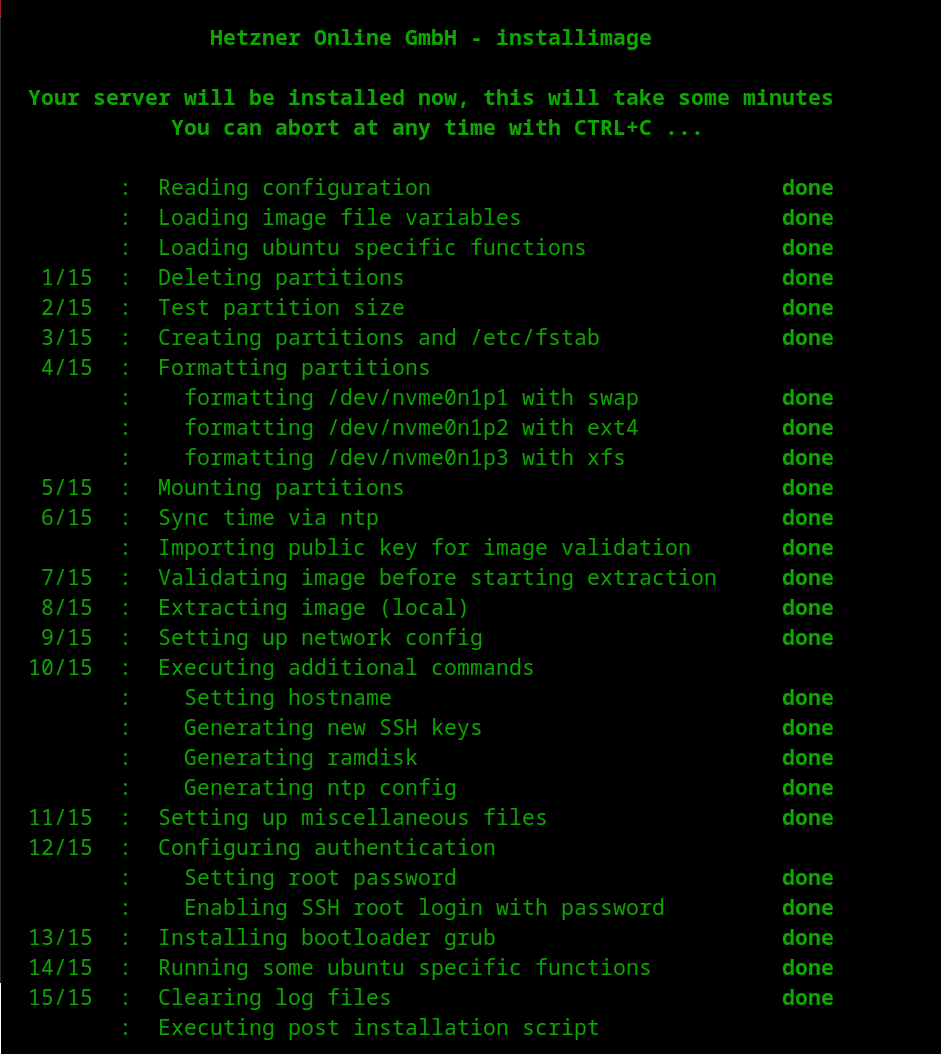
After that I rebooted the server and it was ready to go.
On first boot:
- XFS root will have optimized mount options
- I/O scheduler will be set to none via udev
- sysctl tuning will be applied
- First boot: systemd service will format nvme1n1 and mount /data
With that, I think this was a great investment, and I will be expanding more in the future. For now this server will be used in upcoming analysis.
Look out!!
Thanks for reading!
—
Logs from my setup:
| File | Checksum |
|---|---|
| postinstall_debug.txt | 21649b46654bdcd80964b3577fbc5280faccd0b05f48f2deb6acf1c1119004a3 |
| debug.txt | 8ab8fb219f0b9b5d5ae3aed4084c6c9ecbcd52d7303bdd97d9ca92c370719747 |